
What Is Grid View?
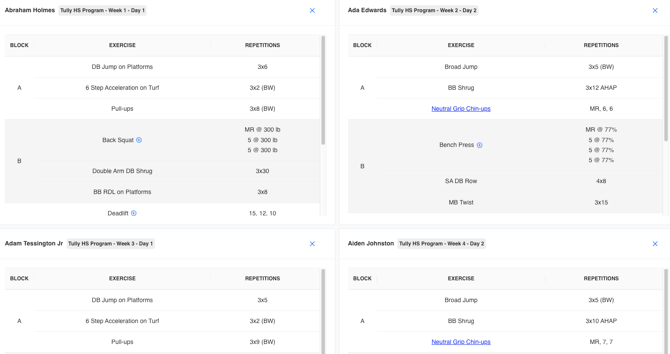
Grid View is designed for scenarios where multiple athletes are training simultaneously in the weight room. It allows the coach to display several athlete programs on a single screen, such as an iPad, TV, or projector. Each section of the screen represents either a specific athlete’s workout or a stage of the training session.
This view helps coaches and athletes easily see workout details in real time, ensuring smooth transitions between exercises and reducing the need to switch screens or devices
How to Access Grid View
-
Navigate to the Programming section on the left sidebar.
-
Click Program Viewer.
-
In the top right corner of the Program Viewer page, click the Grid View button.
- Click on the blue Add Athlete Program button
-
Select the athletes or programs you want displayed.



Example Scenarios
Scenario 1: Multiple Athletes Training
- If multiple athletes are training at one time; whether at the same rack, in different stations, or across the room, the coach can display several athlete programs on one screen.
- For example:
- Athlete A shown in the top left
- Athlete B in the top right
- Athlete C in the bottom left
- Athlete D in the bottom right
- For example:
- Each athlete can follow their own program with unique intensity levels or exercise selection, all while staying aligned with the overall session flow.
Scenario 2: Program Flow View
- Alternatively, a coach could use Grid View to represent different phases of the workout rather than individual athletes.
- For example:
- Top left: Warm-up block
- Top right: First workout phase
- Bottom left: Main lift or primary training block
- Bottom right: Recovery or accessory movements
- For example:
This layout acts as a visual flow of the session, helping athletes see what’s next and stay organized as they move through the workout.
How Grid View Improves Training Efficiency
Grid View streamlines the weight room experience by:
-
Allowing multiple athletes to view their programs at once
-
Reducing screen switching and setup time for coaches
-
Giving athletes a clear view of upcoming exercises and targets
-
Enabling quick data entry during lifts on shared tablets
The result is smoother, faster, and more efficient training sessions.