How to Access the Tully Score Report
-
On the left sidebar, navigate to the Reports section.
-
Click on Tully Scores to open the report view.
Filters Overview
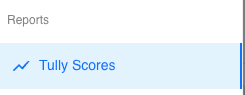
At the top of the page, you’ll find several filters that allow you to narrow down your results. These filters function exactly the same as across the rest of the Tully platform.
The available filters include:
-
Teams – Select specific teams or view all.
-
Groups – Filter by specific groups.
-
Gender – Choose male, female, or clear the filter to view all.
-
Years – Filter by athlete year (e.g., 2024, 2025, etc.).
-
Active/Inactive – Display only active or inactive athletes.
-
Age Range – Focus on a particular age bracket.
-
Time Frame – Choose a specific date range for which you want to view scores.

Viewing and Sorting the Tully Score Table
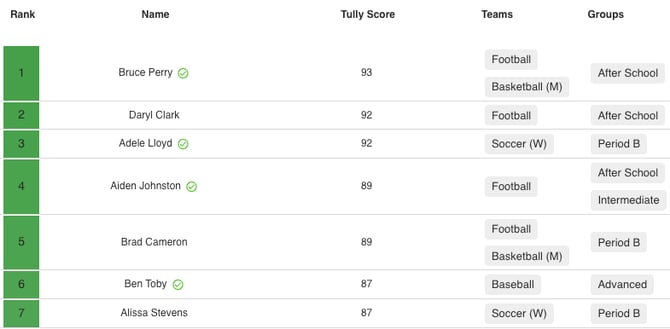
The main table displays the Tully Score data, with the following default columns:
- Rank – Athlete’s position based on Tully Score.
- Name – Athlete’s name.
- Tully Score – Overall score for the selected time period.
- Teams – The teams the athlete is associated with.
- Groups – The athlete’s training or competitive groups.
You can sort by any column:
- Sort by Rank, Name, or Tully Score (ascending or descending).
- Sort by Teams or Groups alphabetically.
Adjusting Tully Score Settings
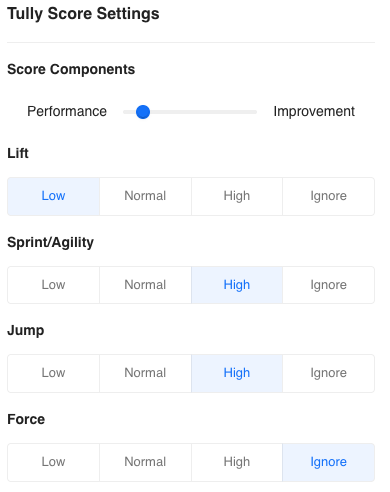
In the top-right corner of the page, select the gear icon to access Tully Score Settings.
Here, you can customize how scores are calculated and weighted:
-
Use the Performance vs. Improvement slider to balance scoring emphasis.
-
Adjust scoring sensitivity for categories like Lift, Sprint/Agility, Jump, and Repetitions by choosing Low, Normal, High, or Ignore.
How Coaches Use Metric Data
The Tully Score is a performance index that helps coaches measure and track athlete development across their entire program. It combines data from multiple areas of training — such as lifts, jumps, sprints, and repetitions — into one unified score.
-
Identify top performers across teams or groups at a glance.
-
Track individual progress over time to see who is improving and who may need additional attention.
-
Compare performance between groups or sports to ensure training programs are driving consistent results.
-
Motivate athletes by showing clear rankings and progress metrics that gamify training.
-
Drive data-informed conversations with sport coaches, parents, and athletes by showing quantifiable improvement.