
Submitting Feedback, Questions, or Reporting Bugs in Tully
- Open the Feedback Menu
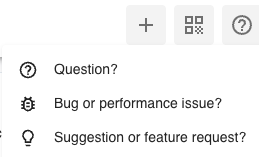
- In the top right corner of your Tully dashboard, click the question mark icon (?).
This will open a dropdown menu with three options:- Question?
- Bug or performance issue?
- Suggestion or feature request?
- Once you have your desired selection move to step 2
- In the top right corner of your Tully dashboard, click the question mark icon (?).
- Submit Your Message
- In the text box, describe your question, issue, or suggestion with as much detail as possible. Once complete, click Send to submit your message to Tully’s Customer Success team. You can click Cancel if you choose not to send the message.
- Await a Response
- After submitting, your message will be reviewed by the Tully Customer Success team. They will reach out in a timely manner to follow up or provide additional assistance based on your feedback.