
Navigating to the Progression Report
On the left-hand sidebar of Tully, navigate to the Reports section and click on Progression.
Using Filters
At the top of the Progression Report, you’ll find several filters to narrow or expand your view of the data. These filters operate consistently across the platform.
-
Metric: Select the metric you want to analyze (e.g., 40 yd Dash, Bench Press, Vertical Jump).
-
Teams: Choose specific teams or view all teams within your organization.
-
Groups: Filter data by smaller sub-groups within teams.
-
Gender: Filter by male or female athletes.
-
Years: View athletes by graduation year or year grouping.
-
Active/Inactive: Choose whether to include only active athletes, inactive athletes, or both.
-
Age Range: Filter results to a specific age range of athletes.
- Time Frame: Select the date range for which you want to analyze progression data.
These filters allow you to focus your analysis, from organization-wide views down to individual athlete progress, depending on your reporting needs.
Submission vs. Calculated Max Toggle
On the right side of the filter bar, you’ll find a toggle for Submission or Calculated Max.
- Submission: Displays the actual recorded value from the athlete’s data entry.
- Calculated Max: Shows the system-calculated maximum for that metric (commonly used for lifts).
Data Overview Widgets
Above the main data table, you’ll see three summary widgets:
- Total Measurements: Displays the total number of measurements captured within the selected filters.
- Avg. Overall Change: Shows the average change between the oldest and most recent measurements in the dataset.
- Avg. Weekly Trend: Calculates the average week-to-week change across all displayed results.
These widgets give a quick, high-level overview of your athletes’ progress at a glance.

Understanding the Data Table
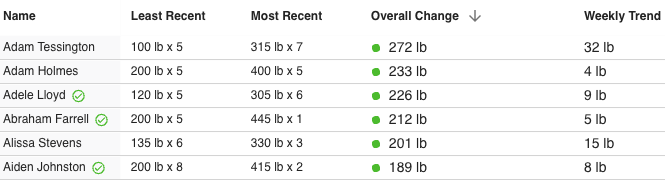
Below the widgets is the detailed data table. Above the table, there is an Export button that allows you to export all displayed data to a CSV file for further analysis.
The table includes the following columns:
- Least Recent: The oldest measurement recorded for the selected metric within the chosen time frame.
- Most Recent: The latest recorded measurement for that metric.
- Overall Change: The difference between the least recent and most recent measurements.
- A green value indicates positive progress or improvement.
- A red value indicates regression or a decrease in performance.
- Weekly Trend: Displays the average rate of change from week to week for that athlete.
This table provides a clear picture of each athlete’s progression, helping you evaluate improvement rates, consistency, and performance outcomes.
Use Case Example: Speed Improvements
A coach wants to analyze how their football athletes have improved in the 40 Yard Dash since last season.
- Navigate to the Progression Report and select 40 yd Dash as the metric.
- Filter the data to include the Football Team, Active Athletes, and a Time Frame from June through October.
- Choose Submission mode to view actual timed results.
- Review the Avg. Overall Change widget to see the average speed improvement across the team.
- In the data table, look for athletes with green positive change values — these athletes have shown measurable progress in their sprint times.
- Export the table to share or review performance results with the coaching staff.
This report helps coaches quickly identify top performers, those maintaining steady progress, and athletes who may need additional focus or recovery.