
Step 1: Open the Forgot Password Flow
-
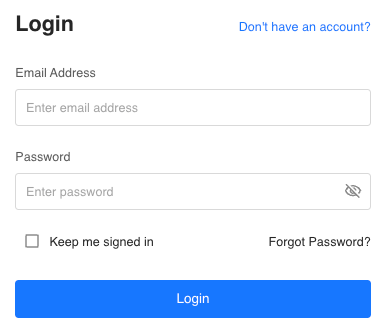
Navigate to the Tully login screen.
-
On the bottom right of the login screen, click Forgot password?
This option appears just above the blue Log In button.
Step 2: Enter Your Email Address
-
You will be taken to a screen titled Forgot Password.
-
Enter the email address associated with your Tully account.
-
Click the blue Send Verification Code button.
Step 3: Check Your Email for the Verification Code
-
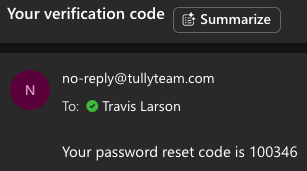
You will receive an email with the subject line Your verification code.
-
If you do not see the email in your main inbox, check your Spam or Junk folder.
-
The email body will include a six-digit verification code.
Step 4: Enter the Verification Code and Create a New Password
-
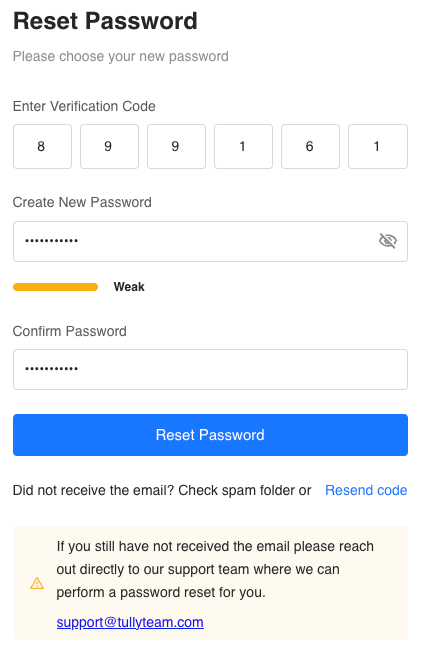
Return to the Tully reset password screen.
-
Enter the six-digit verification code.
You can type each number individually or paste the full code. -
Enter your new password in the Create New Password field.
-
Re-enter the same password in the Confirm Password field.
-
Click the blue Reset Password button.
Step 5: Log Back Into Tully
Once your password has been successfully reset, you can return to the login screen and sign in using your new password.
You should now have full access to your account.
Troubleshooting Password Reset Issues
If you did not receive the verification email:
-
Check your Spam or Junk folder.
-
Click the blue Resend Code button located below the Reset Password button.
If you are still unable to reset your password after trying these steps, please contact Tully Support at support@tullyteam.com