
How do I open the Timer in Tully?
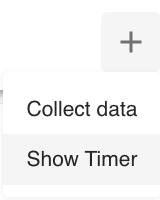
Click the Plus (+) button in the top right corner of Tully and select Show Timer.
-
Can I move the timer? Yes, the timer will appear in the bottom right corner of the screen and can be dragged anywhere for visibility.
What timer modes are available?
Tully includes three timer modes:
-
Stopwatch
-
Countdown Timer
-
Interval Timer
You can switch between modes directly within the timer window.
What is Stopwatch mode?
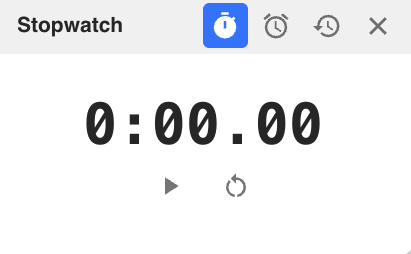
Stopwatch mode runs continuously once started.
-
Displays time in minutes and seconds
-
Press Play to start
-
Press Pause to stop
-
Press Reset to return to zero
Best used for open ended drills, testing, or tracking total workout time.
How does Countdown Timer mode work?
Countdown Timer mode allows you to set a specific time and count down to zero.
-
Set minutes and seconds
-
Press Play to begin
-
Use Pause or Reset as needed
There is a Speaker icon that allows you to turn sound alerts on or off. When sound is enabled, you will hear a notification when time expires.
Best used for rest periods, timed sets, or stations.
How do I use the Interval Timer?
Interval Timer is designed for structured work and rest cycles.
You can set:
-
Number of rounds
-
Work duration in minutes and seconds
-
Rest duration in minutes and seconds
After pressing Play, the timer begins with a 3, 2, 1 countdown and automatically cycles between work and rest periods.
You can:
-
Pause at any time
-
Reset the timer
-
Turn sound alerts on or off
Best used for circuits, conditioning sessions, or interval based training.
Can I turn the timer sound off?
Yes. Each timer mode includes a Speaker icon that allows you to toggle sound alerts on or off.
When should I use each timer mode?
-
Use Stopwatch for open ended timing
-
Use Countdown Timer for fixed rest or work periods
-
Use Interval Timer for repeated work to rest cycles