
Step 1: Navigate to Organization Settings
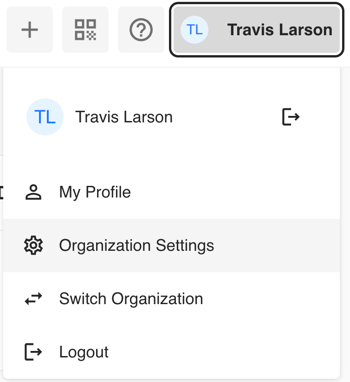
From anywhere in Tully, click on your name in the top-right corner of the screen. A dropdown menu will appear.
Select ⚙️Organization Settings (the gear icon).
Step 2: Open the Coaches & Administrators Page
Once inside Organization Settings, you’ll see a section titled Coaches & Administrators.
This table lists everyone who currently has access to your organization as a Member or Admin.
Note: Only Admins can add or edit people on this list.
Click the blue + Add Person button in the top-right corner.

Step 3: Add a New Coach or Administrator
After clicking + Add Person, a pop-up window will appear asking for details about the new coach.
Step 1: Enter the coach’s email address.
Step 2: Select their role from the dropdown list:
- Admin – Has full access to all components of the organization.
Admins can enter data, create and edit programs, manage rosters, and modify site settings. - Member – Can collect and view all data but cannot alter metrics, programs, or the roster.
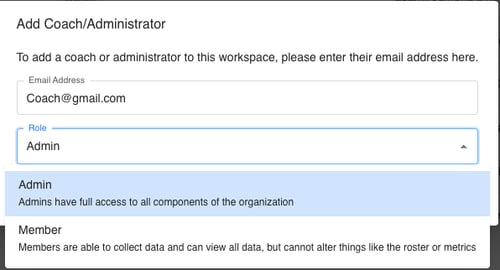
Step 3: Once you’ve entered their information and selected a role, click Add to save.
Step 4: Review Your List
The new coach or administrator will now appear in the Coaches & Administrators table within Account Settings.
You can return here anytime to view, edit, or remove users as needed.
Quick Summary
- Access this feature via Organization Settings under your profile.
- Only Admins can add or edit coaches.
- Choose between Admin (full access) and Member (limited access).
- Use the + Add Person button to invite new staff by email.