
Navigating to Athlete Summary
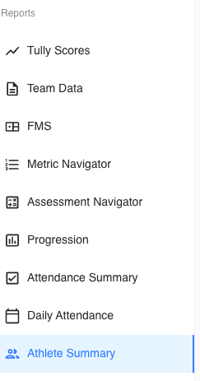
On the left-hand sidebar of Tully, navigate to the Reports section and click Athlete Summary.
Selecting an Athlete
At the top right of the page, use the Athlete filter to choose the specific athlete whose data you want to view.
Athlete Profile
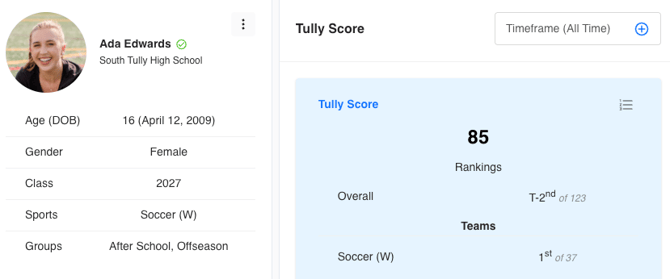
The Athlete Summary dashboard begins with two main sections:
-
Profile Card (left side): Displays the athlete’s name, profile image, organization, age, gender, class year, sports, and assigned groups.
-
Tully Score (right side): Displays the athlete’s current Tully Score, with the option to change the timeframe filter.
Click the 1-2-3 icon above the Tully Score to view how the athlete ranks compared to their peers within the organization.
Statistics and Trends
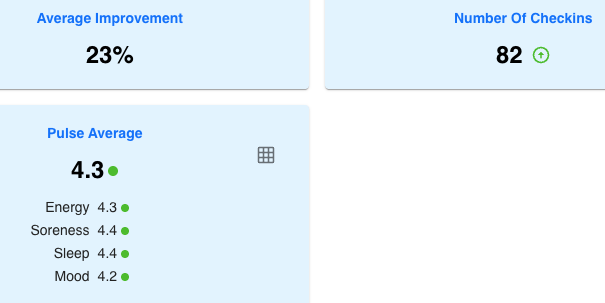
The Statistics & Trends section provides high-level performance and engagement metrics. You can adjust the timeframe filter to focus on a specific period.
-
Average Improvement: The overall percentage of improvement across all tracked metrics.
-
Number of Check-ins: The total number of times the athlete has checked in.
-
Pulse Average: Displays the athlete’s average scores from the Pulse Survey.
Click the table icon within the Pulse widget to see individual averages for:-
Energy, Soreness, Sleep, and Mood
-
Metrics and Assessments
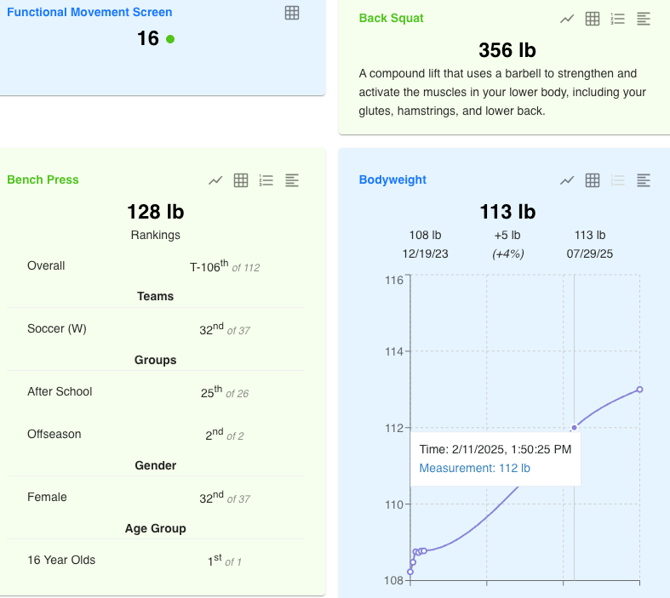
The Metrics and Assessments section shows detailed performance data for both metrics and assessments attached to the athlete’s profile.
You can toggle between:
-
Current: Displays the most recent result for each metric.
- Personal Best: Displays the athlete’s all-time best performance.
Each card includes:
- A graph view showing performance progression over time.
- A table view for a detailed breakdown of entries.
- The 1-2-3 rankings button to see how the athlete ranks within their organization.
- The metric or assessment name with its description.
Use Cases
For Coaches
-
Athlete Summary helps coaches evaluate athlete progress, identify focus areas, and have informed conversations with athletes, sport coaches, and parents about performance and development.
For Athletes & Parents
- Athletes can monitor their own growth, understand where to improve, and celebrate progress. The visual trends make it easy to stay motivated and accountable.
For Recruiting
- Athlete Summary can be used as a recruiting tool, providing a clear snapshot of the athlete’s performance history and progression over time.